Unisoc · SPRD · ASR · Rockchip · HiSilicon Kirin · Samsung

FRP removal &
factory reset,
in one click.

A portable Windows tool for repair shops. Read device info, then remove FRP or factory reset supported Unisoc, ASR CPU and Rockchip PX30 devices, unlock HiSilicon Kirin over VCOM testpoint, and flash Samsung with the classic Odin 3.14 protocol. Unlimited jobs while your 3, 6 or 12-month account is active.

Latest release v2.9 Windows 10 / 11 · 64-bit · Portable EXE
U
Unisoc / SPRDDIAG to FDL to FRP
A
ASR CPUFastboot operations
R
Rockchip PX30Userdata + FRP erase
H
HiSilicon KirinVCOM unlock · no loader pack
S
Samsung OdinLOKE 3.14 · full or custom
Plans

Simple plan pricing

Choose your activation period. Every plan includes unlimited jobs and one-PC HW binding.

3 Months

$10USD
  • ✓ Unlimited FRP jobs
  • ✓ Unlimited factory resets
  • ✓ All supported platforms
  • ✓ One-PC HW binding
Activate 3 months

6 Months

$17USD
  • ✓ Unlimited FRP jobs
  • ✓ Unlimited factory resets
  • ✓ All supported platforms
  • ✓ One-PC HW binding
Activate 6 months
Features

Everything a repair bench needs

One small EXE. No installation, no bundled filter drivers, no extra setup.

Device info

Read model, chipset and firmware details on supported devices before you run an operation.

FRP removal

Remove Google FRP in one job. Unlimited FRP removals while your account is active.

Factory reset

Clean factory reset and FRP job for supported SPRD and ASR CPU devices from one window.

Unisoc DIAG → FDL → FRP

Automatic DIAG entry, FDL loading and FRP reset flow for Unisoc / SPRD handsets.

ASR CPU support

Fastboot-based info and FRP operations for ASR CPU phones, including HOTWAV models.

Rockchip PX30

Loader detection, device info, then userdata + FRP erase using the stock Windows driver only.

HiSilicon Kirin

VCOM testpoint unlock for Kirin 710/710A/970/980 and K3V2, with embedded loaders and device info.

Samsung Odin flash

Classic Odin 3.14 / LOKE protocol: flash BL, AP, CP, CSC or a single raw image, with factory LZ4 decoded on the fly.

Built-in auto update

The app checks for new builds on launch, so you always run the latest version.

Portable single EXE

One executable, no installer. Copy it to any Windows 10 or 11 64-bit PC and run.

Screenshots

Live operation log

Every step is shown while the job runs: connection rules, device info, partitions, erase progress and the final result.
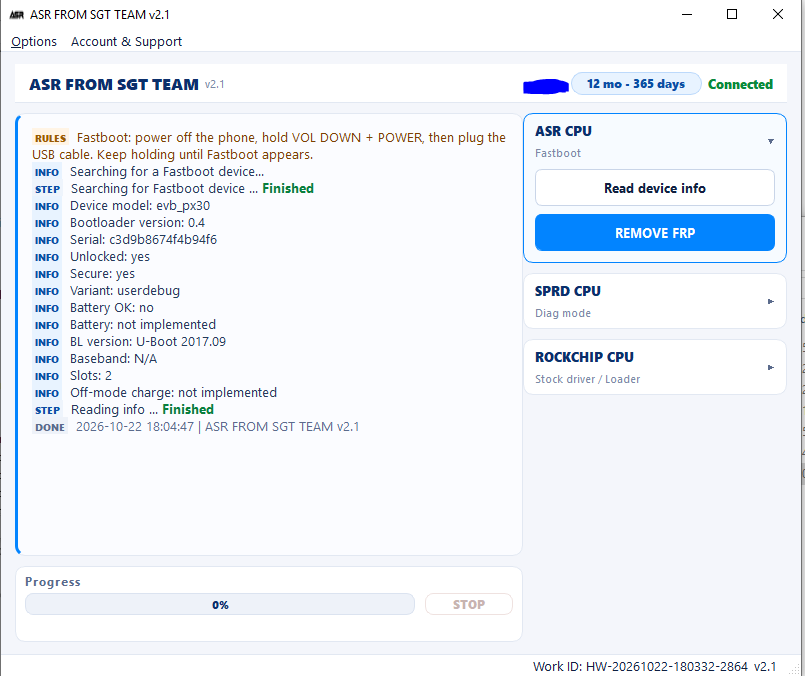
ASR CPU Fastboot device information in ASR FROM SGT TEAM v2.1
ASR CPUFastboot · read device info
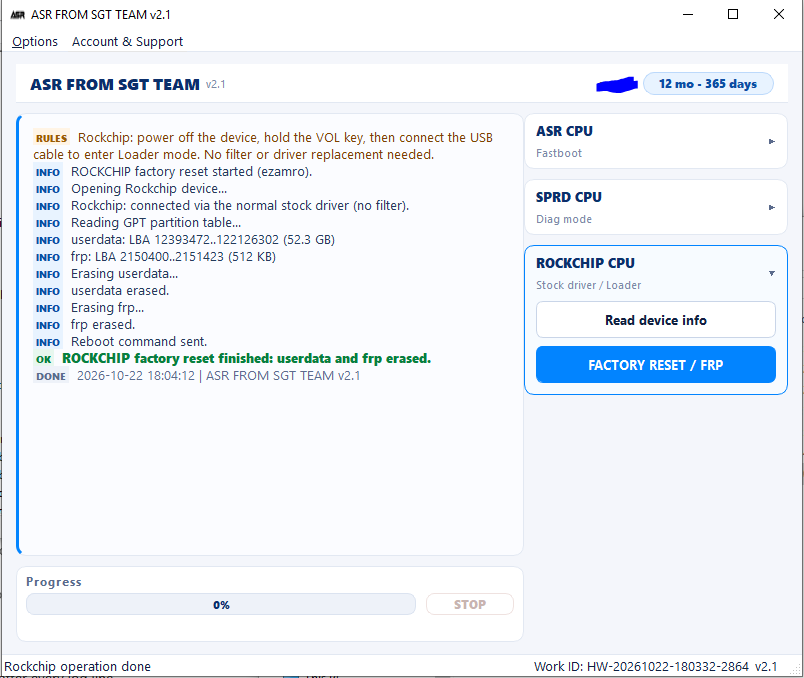
Rockchip PX30 userdata and FRP erase in ASR FROM SGT TEAM v2.1
Rockchip PX30Loader · userdata + FRP erase
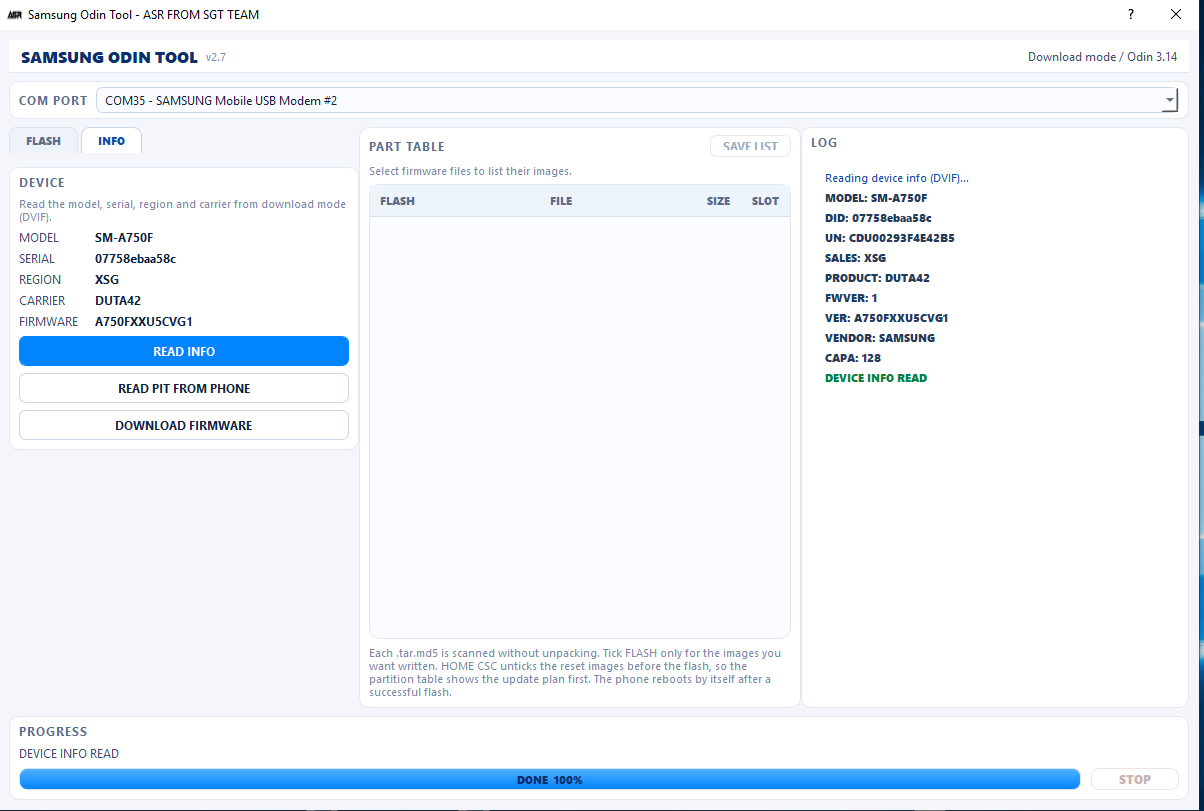
Samsung SM-A750F device info read over DVIF in download mode in ASR FROM SGT TEAM v2.7
Samsung SM-A750FDownload mode · device info
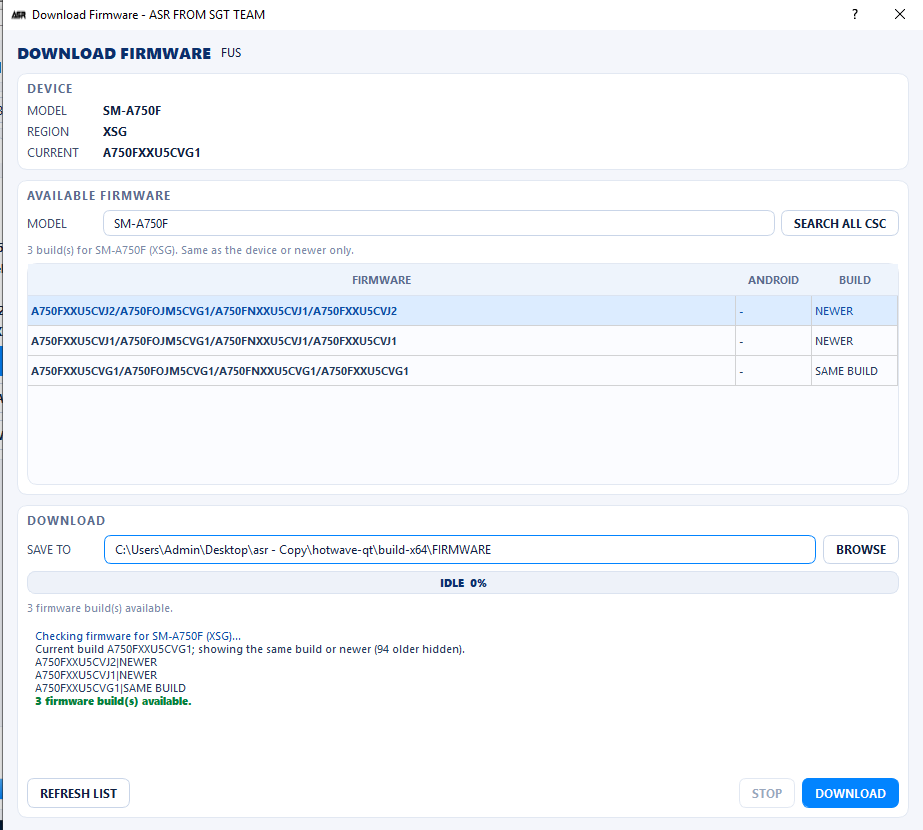
Samsung firmware list from the server in ASR FROM SGT TEAM v2.7
Samsung firmwareDownload firmware · beta
Rockchip support

Rockchip PX30 is built in

Read the device in Loader mode, then erase userdata and FRP in one verified flow. The Rockchip path uses the stock Windows driver only.

  • ✓ Reads PX30 Loader info: chip, ID and USB identity
  • ✓ Erases userdata and frp partitions
  • ✓ No USB filter, WinUSB, libusb or UsbDk required
  • ✓ Device info and unlimited jobs on an active account
Verified on PX30 LoaderVID_2207 · PID_330D · chip 6233 · ID 0x330d
Rockchip operationPX30 Loader
Connected
ConnectionVOL key + USB
USB IDVID_2207 / PID_330D
Chip6233
Targetuserdata + frp
[OK] Loader detected
[OK] Device info read
[OK] userdata erased
[OK] frp erased

Stock Windows path only. No filter driver installation.

New · HiSilicon support

HiSilicon Kirin, unlocked over VCOM

Put the phone in testpoint VCOM mode and the tool sends the factory loaders, unlocks fastboot and reads the device. No separate loader pack, no manual file picking.
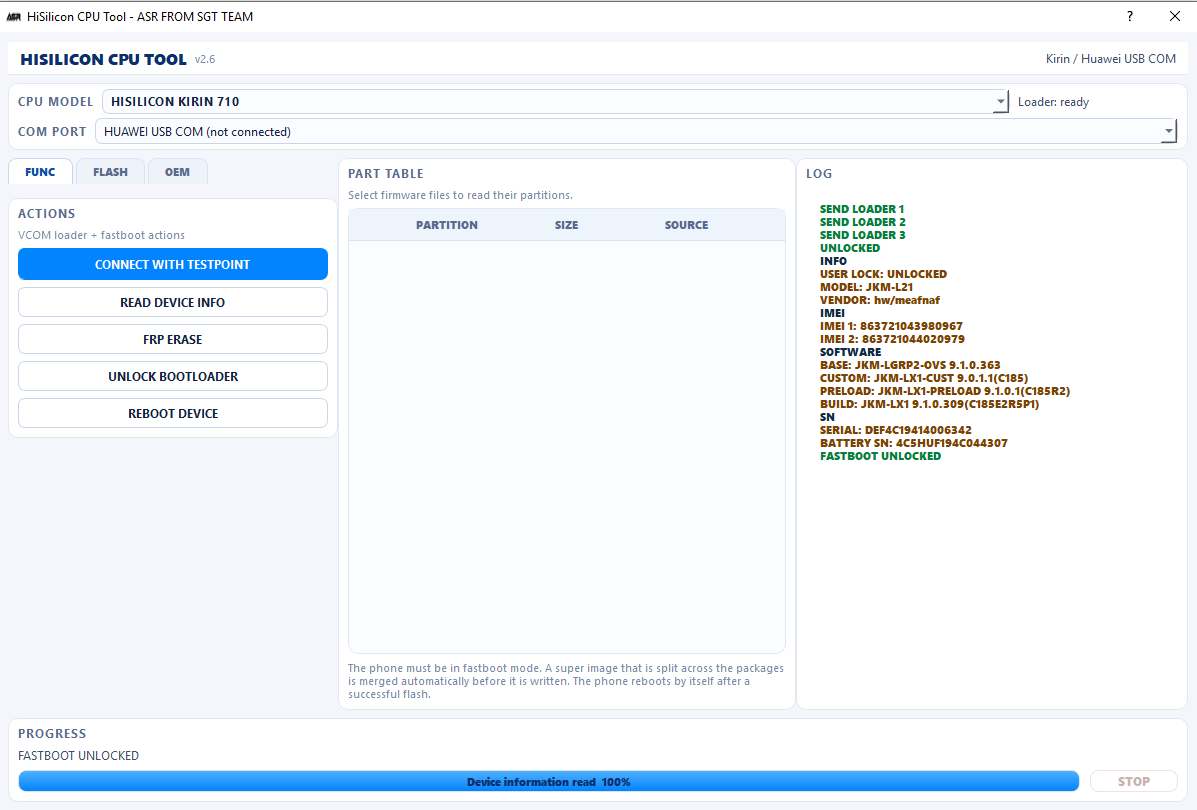
  • ✓14 Kirin loader chains - 620/620C, 65X, 710/710A, 925-955, 960, 970, 980 and K3V2
  • ✓ All loaders embedded in the single EXE - nothing to download
  • ✓ Automatic loader re-connect while the phone stays in loader mode
  • ✓ Reads model, vendor, IMEI 1/2, firmware, serial and battery SN
  • ✓ FRP erase, firmware flash and full dump after the unlock
Verified on Kirin 710JKM-L21 · VCOM testpoint · FASTBOOT UNLOCKED
HiSilicon Kirin 710 unlocked from VCOM testpoint, device info read and FASTBOOT UNLOCKED in ASR FROM SGT TEAM v2.6
Kirin 710 · real testVCOM testpoint → unlock → device info
New · Samsung support

Samsung flashing, the Odin 3.14 way

Boot the phone into Download mode and the tool drives it over the classic LOKE protocol - the same one Odin 3.14 uses. Load the five factory packages, or tick only the partitions you actually want written.
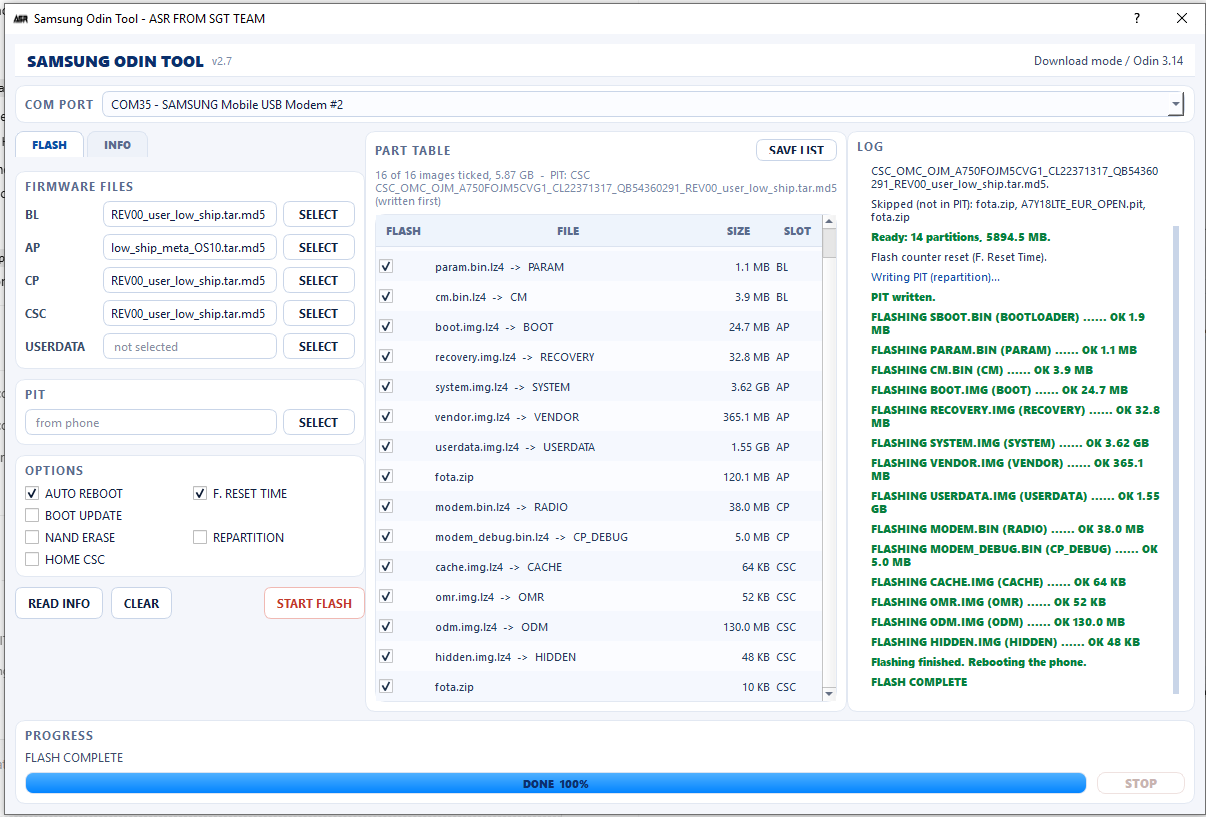
  • ✓FLASH ODIN PROTOCOL - LOKE 3.14 with BL / AP / CP / CSC / USERDATA slots, per-partition progress and a live log. Factory .lz4 images are decoded on the fly.
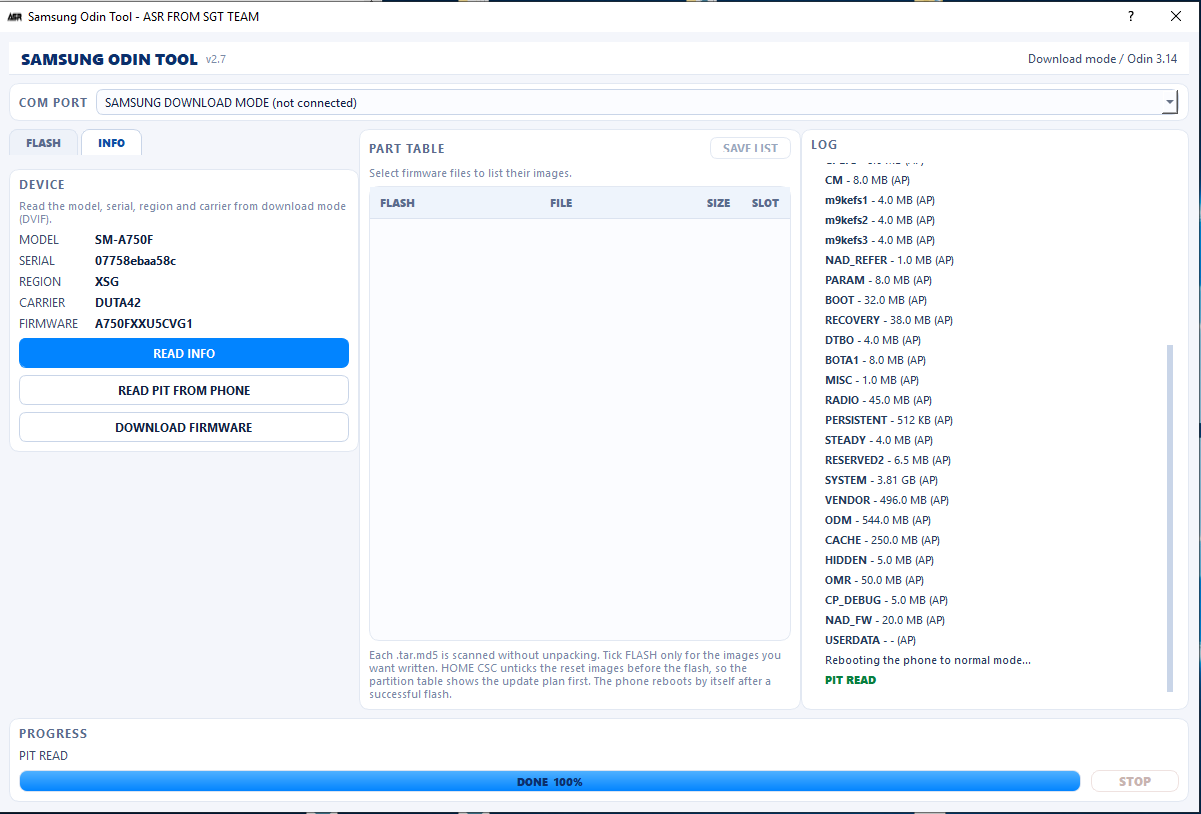
  • ✓READ INFO · DOWNLOAD MODE AND MTP MODE - one key gives model, serial, region, carrier and build. A phone that is booted normally is rebooted into Download mode by itself.
  • ✓DOWNLOAD FIRMWARE (beta) - list the same or newer builds for the model and region and pull them straight onto the PC.
  • ✓READ PIT FILE - take the partition table off the phone, list every partition with its size and slot, and keep a .pit backup next to the EXE.
  • ✓FLASH FULL OR CUSTOM - the complete firmware set, a selected part of it, or one raw .bin / .img / .asr / .tar.md5 file.
Verified on SM-A750FXSG · DUT42 · 5.87 GB · FLASH COMPLETE
Samsung SM-A750F full firmware flash finished with every partition OK in ASR FROM SGT TEAM v2.7
Full flash · real testBL + AP + CP + CSC → every partition OK
Samsung PIT read from the phone with the full partition list in ASR FROM SGT TEAM v2.7
READ PIT · real testphone table → .pit backup
Coverage

Supported platforms and models

Unisoc DIAG to FDL to FRP, ASR CPU fastboot, Rockchip PX30, HiSilicon Kirin and Samsung over Odin. More models are added regularly.

models
# Model / platform Platform Operation
How it works

From download to done

No installation and no complicated setup.

1

Download and run

Grab the latest build and run the EXE on Windows 10 or 11 64-bit.

2

Sign in

Use your account on this PC. Need activation or renewal? Message us with your HW code.

3

Connect the phone

ASR CPU: hold VOL DOWN + POWER and plug USB. Unisoc: power off and plug USB. Rockchip: hold the VOL key and connect USB. Samsung: hold VOL UP + VOL DOWN and plug USB for Download mode - or leave the phone booted and let the tool reboot it.

4

Run the job

Read device info, then run unlimited FRP or factory reset jobs while your account is active.

Contact

Need activation or renewal?

Message us on WhatsApp or Telegram with your HW code. Choose 3, 6 or 12 months and we will activate your account.

Download latest version